Google

Sunday, July 8, 2007

Hack-a-Fox: Tool For Freeing Firefox!

To enjoy this site as intended simply press F11. Pressing F11 again will return to normal.


CATEGORY: FIREFOX

If you're anything like me (and I know I am) you use a number of different computers to do whatever it is you do on web. And you're a pretty rare person if you happen to have the same exact configuration on each of them (just in case you didn't know.) In my case my most powerful computer is the one I actually use the least, and that has everything to do with CONVENIENCE. Yes, the cheapie laptop, one of those $499 Best Buy specials, is the one that gets most of the use around here. If I were doing anything more with it besides using the internet and editing a few images here and there it would surely die a painful and horrible death. But I knew when the price tag lured me in that there would be many a trade-off. The first real world example of that trade-off was when the 512mb of ram got a teency-weency bit bogged down while using Firefox (does having 30 tabs open normally make a difference?) Enter - the reason for this post. (Exit - long winded and completely unnecessary introduction.)

AnalogX, a small but diverse software company, have released a gem of a utility they call Maxmem. The MaxMem utility itself is small as well - not just in it's layout (it simply sits in the system tray), but more importantly in it's memory footprint (it's eating up a whopping 920k as I write.) That's actually pretty amazing! What else can you think of off the top of your head that takes up less than 1mb of RAM that is as useful as MaxMem? Well, I guess you're probably saying "How would I know? You haven't even told me what it does!!" And you would be right - but not for long!

You know when your computer (Windows users only) seems to get slower . and . . s l o w e r . . and . . s . . l . . o . . w . . e . . r . . the longer it remains on? Well, the simplest way to think about MaxMem is imagining it restarting your computer for you and getting you back to where you were working, all in about 10 seconds. It doesn't shut down or move anything, it just frees up memory in a similar way that restarting your system would. A nice time saver indeed! Especially when Firefox tends to push memory consumption to ridiculous proportions many times on my poor weakling of a computer. At least I now have a quick and very effective solution, and so do you!

I have a forthcoming article
written to the computer novice that explains the difference between Internet Explorer, Firefox, and Opera because I still seem to find a good number of folks who say that they've heard of Firefox but either don't know what it is, or if they do, why they should even consider switching (almost always from IE). In this article I am forced to confront the memory issue that has plagued Firefox users, no matter what their computer, for quite a while now. I'm not going to get into the details here of why that happens, but suffice it to say that most of the "memory hog" issue can now be resolved thanks to MaxMem. And since that is the most important criticism of using Firefox (in my opinion) it leaves very little reason not to join the ranks of the literally zillions of people who now use Firefox every time they surf!

Thuh end.


Your Voice:
What web browser do you use? Why? (I'm only referring to when you actually have a choice in the matter -
most IT guys won't let you pick whatever you feel like.) Let us all know by clicking "comments" below.


Friday, July 6, 2007

The Case For Aliens Rekindled Once More...

To enjoy this site as intended simply press F11. Pressing F11 again will return to normal.


CATEGORY: SHOCKING!

"Sixty years ago, a light aircraft was flying over the Cascade Mountains in Washington state, at a height of around 10,000 feet. Suddenly, a brilliant flash of light illuminated the aircraft. Visibility was good, and as pilot Kenneth Arnold scanned the sky to find the source of the light, he saw a group of nine shiny metallic objects flying information. He estimated their speed as being around 1,600 mph - nearly three times faster than the top speed of any jet aircraft at the time. Soon, similar reports began to come in from all over America. This wasn't just the world's first UFO sighting - this was the birth of a phenomenon..."

The deal with this story is that this guy worked for the government and hadn't told a soul that he'd actually witnessed aliens and their crashed UFO in a giant hangar. He was sworn to secrecy because of his job and evidently didn't tell a soul until he was on his death bed. Then, with nothing to lose, he let the following story out.

continue story via This Is London »


Your Voice:
So what's your opinion? Do you think we are really alone? If you are a naysayer, then you also have to make sense of things like this. But if you are a believer, you also have to battle the tremendous odds against life existing elsewhere
(at least the kind of life that is able to communicate with us in a way that we can understand) and that they're smart enough to get here. Click here to leave your opinion.


Tuesday, July 3, 2007

How To Get There (Barely!) On The Cheap

To enjoy this site as intended simply press F11. Pressing F11 again will return to normal.


CATEGORY: ADVENTURE!

John Ninomiya, who runs the clusterballoon.org website, says that the ancient movie “The Red Balloon”, where the kid floats away at the end hanging from a bunch of balloons, was what inspired a lifetime of ballooning for him, and his pioneering work in the field of cluster ballooning. According to Ninomiya, he’s one of six people in the world doing this, and the only guy in North America...
continue story via Gadgetopia »


Your Voice:
How much would "they" have to pay you to try that? Let us all know by clicking "comments" below.


Monday, July 2, 2007

ToonDoo - A Free Web-Based Cartoon Maker

To enjoy this site as intended simply press F11. Pressing F11 again will return to normal.


CATEGORY: WEB 2.0

Not too much to expound on here. ToonDoo is just a simple & super-fun idea! Now all you Gary Larson wannabes can step it up a level by getting all those cartoon ideas you have floating around in your cranium out and into the real (virtual) world!
Click to go straightaway to Toon Doo »


Your Voice:
Take a look at ToonDoo, then check out
StripCreator. Tell us which one worked better for you and why!


Sunday, July 1, 2007

Oboe - Free Unlimited Music Storage!

To enjoy this site as intended simply press F11. Pressing F11 again will return to normal.


CATEGORY: MUSIC

Just got this in my e-mail - thought I'd share it with you:

"Hello!

Congratulations! Your 1 GB Oboe music locker has been upgraded to UNLIMITED STORAGE.

Yes, we said unlimited storage for all of your music - FREE! (no catch, no credit card, completely free) Sync, stream, and listen to your music anywhere in the world, on any computer or web-enabled device. If you don't already have Oboe Sync installed, you can start syncing your music today!

Give a gift to your music loving friends -- forward them the priority code below! They'll get an express upgrade to free, unlimited storage when they sign up with the code. Send it to as many people as you'd like - it will only be activated for the first 3 folks that use it.

Cheers!
--The MP3tunes Team"


Well how cool is that? I'll stick it up here for the first three people to clicky clicky. No complaints allowed if you get beat to the punch. BTW, if you don't know what MP3 Tunes is, you can click here to find out. It's a really cool service! I've started uploading bunches of songs while I sleep in hopes of eventually having my whole collection on the web.

If the whole MP3tunes & Oboe thing is confusing, it's actually really simple. Oboe is just a bunch of hard drive space on the web set aside for your music. MP3tunes is the web-based software application (Web 2.0) that is the actual player, like Windows Media Player or iTunes, that plays the songs you store with Oboe. Now go see if you are one of the three to get the unlimited size music locker!

click here to magically arrive at MP3tunes »
Be sure to use Priority Code 189d17c1d857c8ad when you sign up to see if you get the free locker!


Your Voice:
1. Where do you listen to most of your music? Car? Computer? Portable?
2. Does the idea of having all your music on the web for access anywhere sound appealing?
Let us all know by clicking "comments" below.


Tuesday, June 26, 2007

Boomerang Talk Show Segment

To enjoy this site as intended simply press F11. Pressing F11 again will return to normal.


CATEGORY: JUST FOR FUN!

So today I was chatting with a friend via e-mail who mentioned that he was laughing pretty hard at the David Blaine post from a few weeks ago. And then I was all like "well if you think that is funny did you check out this post?" And then I was thinking that this site's tag line is "A Blog About Neat-o Sites, Software, Silliness, and Other Awesome Thingy's" and how I think I need to have a little more of the Silliness. So today I give you a video clip from the French talk show "Boomerang". This episode features a guest and her husband who lost his family jewels. They are here to talk about it; the host is here to... well, you'll see. So here it is: another Awesomer Thingy!
via YouTube »


Your Voice:
Does this look like it's an authentic talk show or does it seem like it's all just a set up to do a fake segment? Let us all know by clicking "comments" below.


Monday, June 25, 2007

The 50 Best Limited Release Films of 2006

To enjoy this site as intended simply press F11. Pressing F11 again will return to normal.


CATEGORY: MOVIES

A brief post for you on Awesome Thingy of the Day today, but a good one. You'll make up for the twenty seconds on this site by spending your time over at Rotten Tomatoes. They've put together a list of the 20 Best Limited Release Films of 2006, which I think is an awesomer idea. I know that there have gotta be a fair amount of movies that I would have a good chance of enjoying but have never even heard of. And it's not like I even had a chance - many of the advertising/promotional budgets for these kind of films are in the neighborhood of what I take home every year. And by that I mean pretty much non-existant.

Lists like this save me a huge amount of time searching around and trying to separate the wheat from the chaff, so to speak. There have been one too many times that I've gone to the movie store and come home with a few hopefuls, only to turn them off half way into the flick. Well NEVER MORE! I have this list and I SHALL NOT FAIL!!!


Your Voice:
So what kind of movies do you generally prefer: Art House/Independent, Big Studio, Documentary? Others? Let us know by clicking "comments" below.


Sunday, June 24, 2007

Robby The Robot - Exclusive In Home Appearance


Remember Robby The Robot from that sci-fi classic Forbidden Planet? Wasn't he cute, loveable, and cuddly? (in a cold, steel, robotic kind of way, I mean.) If you are one of those who still can't get Robby out of your head even after all these years, you now have the chance to own him.

Before you make the jump, how much do you think he costs? Got a number in your mind? Alright, then click to see The Genuine 7-Foot Robby The Robot.

After you get back from the jump you godda let us know how much you really expected Robbie to be! Click here to leave your comment.


Friday, June 22, 2007

Price of Gas in Caracas?


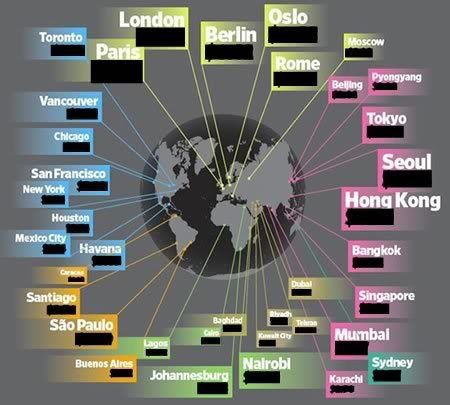
Prices of gasoline around the world. Actual numbers have been blocked out until
you complete the quiz below (if you so choose) as to not give away the answers!


According to this news story, the price of gas in Caracas is just 12 cents a gallon! The price of gas in Caracas. Sounds like a bad attempt at Venezuelan gangsta-activist-rap. So anyway, whilst reading my trusty Wired Magazine a few days ago I discovered an article that reported the purported (oooh! more rap!) price of gas all around the globe. Some of it shocked me, some of it not-so-shocked me. I thought the info itself was blog worthy, but I spent the last few hours attempting to make your interaction with the data a bit more interactive than I experienced myself. Were my efforts just a waste of time? I don't know. Please leave a comment below to let me know. (Dang! More rhymes!)

I made a quiz using SurveyGizmo.com to test your knowledge and a bar graph using DabbleDB.com to reveal the answers. I was actually considering writing a post about SurveyGizmo as well but I don't think it has much of a "wow factor", even though it is flexible, useful, and free. I was also considering writing about DabbleDB but then concluded that although it is one of the most useful Web 2.0 apps around, blogging about it would be akin to blogging about that one cool company called Google. So instead of reinventing the wheel with DabbleDB, I'll just point you to an excellent demonstration video explaining what it is and why you need it.

I was trying to think of something that I could give away to those who answer all ten questions in the quiz correctly, but with a promotion budget of, ummmmmm......, zero, I had to get creative. (I was actually going to give away a real lass, only because of it's obvious value to the rap community: "Guess the Gas, Win the Lass!") but was subsequently reminded that it is now illegal to sell or give away such things.) So rather than objectify something legally unobjectifiable (an objectionable practice, to be sure), I decided to give each winner a chance to pick from a few web links to some certain awesomer thingy's. They are things that have real value (the first one costs $20 usually) but the links to most of the deals/items/services are not commonly known about. If you win and you find one of the items to be useful, then you had fun and you got something of value! But if you lose, or if you win and don't need what's being offered, I sincerely apologize and hereby offer up my head on
a stake or a platter, winner picks. Now there's a prize!

Contest rules:

1. Contest rules are guaranteed to not be as ridiculous as our previous contest's rules.
2. You may not use information obtained after learning of this contest to answer any
questions.
3. You may not play the quiz more than enough times as is necessary to win. huh??
4. You may may not redeem more prizes than are actually linked to on the winner's page. huh???
5. Oh, I don't know. Some other rule.

This is all based on the honor system, which, if you know nothing about, then, well, I suggest you just, umm, go, and like, learn about being an honorable person or something...

When you finish you may come back and read the original story in the June 2007 issue of Wired Magazine. Remember, that link has all the answers, so don't do the clicky-clicky until you try to beat the quiz.


Sunday, June 17, 2007

The Hyperwords Project - A True Time Saver!


Hyperwords

Am I the only one around here who hasn't been using Hyperwords? I remember reading about it in the past a time or two and thinking that there were already a hundred other things that can do what it claims. Well, it recently presented itself to me again and this time I took a closer look. And I am glad that I did! Hyperwords will definitely save you a bundle of time once installed in your Firefox browser. But what's this you say?? You don't use Firefox?!? Anticipating that possibility, I've already taken the liberty to begin preparing a new post highlighting the many reasons why you would want to use Firefox if possible. (I realize some work environments or older computers might frown upon such a thing.) If there is no way to get Firefox on your computer, The Hyperwords Project will have a standalone version for PC and Mac available later this year.

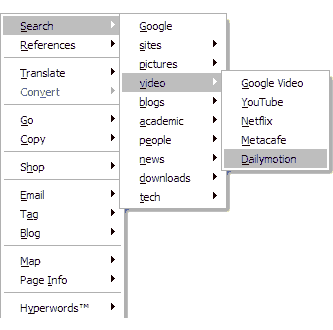
But what exactly is Hyperwords? Simply put, it's a menu that appears when you select any text in your browser that allows you to take your next action with one simple click. Let's say you're reading an interesting news piece from Reuters and you want more information about the article's subject matter. Normally, you might go to CNN, Google News, or another news site, then type in some keywords from the story in hopes to find more coverage on it. You would then repeat this whole process until you were sastisfied with the amount of information you read. So how would this process work if you had Hyperwords? You would simply select a word or phrase from the story (the title, key figures, etc.), and a menu would appear. If you then selected "search - news" you would be presented with about 10 news sites to use for your search - all with that one click. This process also works with linguistic translations, monetary conversions, nutritional information, shopping, maps & directions, blogging, e-mail, stocks, and much more. The items that populate the menu are also customizable, as well as their behaviours. There's a lot to like here!

If you find yourself loving the concept of Hyperwords but are craving more, you may want to give Adaptive Blue's Bluemarks a try (future post pending). Although I really do love Bluemarks, sometimes I feel a bit lost in it's mammoth environment. Incidentally, Hyperwords' most attractive feature becomes it's simplicity when compared to Bluemarks. Everything is in one easy menu. In fact, the only gripe I can muster up about Hyperwords is a feature that it lacks - you cannot arbitrarily add sites to the menu. However, the choices that are available are likely to cover at least 90% of the situations one would encounter in typical browsing session. In a way, I am actually glad that they drew the line between "useful" and "bloated" where they did. If there were any more features, we'd be looking at a Bluemarks wannabe (and failure!); any less features and it would function just like the hundreds of other context-menu tools available for Firefox.


Visit the
Hyperwords blog here.
Hyperwords homepage here.
Hyperwords extension here.Adaptive Blue's Bluemarks


Screenshot of Hyperwords' context menu