Am I the only one around here who hasn't been using Hyperwords? I remember reading about it in the past a time or two and thinking that there were already a hundred other things that can do what it claims. Well, it recently presented itself to me again and this time I took a closer look. And I am glad that I did! Hyperwords will definitely save you a bundle of time once installed in your Firefox browser. But what's this you say?? You don't use Firefox?!? Anticipating that possibility, I've already taken the liberty to begin preparing a new post highlighting the many reasons why you would want to use Firefox if possible. (I realize some work environments or older computers might frown upon such a thing.) If there is no way to get Firefox on your computer, The Hyperwords Project will have a standalone version for PC and Mac available later this year.
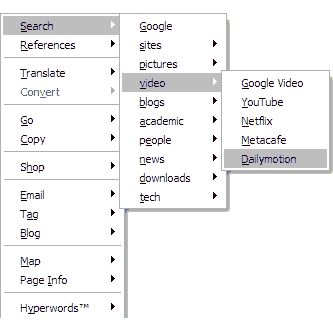
But what exactly is Hyperwords? Simply put, it's a menu that appears when you select any text in your browser that allows you to take your next action with one simple click. Let's say you're reading an interesting news piece from Reuters and you want more information about the article's subject matter. Normally, you might go to CNN, Google News, or another news site, then type in some keywords from the story in hopes to find more coverage on it. You would then repeat this whole process until you were sastisfied with the amount of information you read. So how would this process work if you had Hyperwords? You would simply select a word or phrase from the story (the title, key figures, etc.), and a menu would appear. If you then selected "search - news" you would be presented with about 10 news sites to use for your search - all with that one click. This process also works with linguistic translations, monetary conversions, nutritional information, shopping, maps & directions, blogging, e-mail, stocks, and much more. The items that populate the menu are also customizable, as well as their behaviours. There's a lot to like here!
If you find yourself loving the concept of Hyperwords but are craving more, you may want to give Adaptive Blue's Bluemarks a try (future post pending). Although I really do love Bluemarks, sometimes I feel a bit lost in it's mammoth environment. Incidentally, Hyperwords' most attractive feature becomes it's simplicity when compared to Bluemarks. Everything is in one easy menu. In fact, the only gripe I can muster up about Hyperwords is a feature that it lacks - you cannot arbitrarily add sites to the menu. However, the choices that are available are likely to cover at least 90% of the situations one would encounter in typical browsing session. In a way, I am actually glad that they drew the line between "useful" and "bloated" where they did. If there were any more features, we'd be looking at a Bluemarks wannabe (and failure!); any less features and it would function just like the hundreds of other context-menu tools available for Firefox.

Hyperwords blog here.
Hyperwords homepage here.
Hyperwords extension here.Adaptive Blue's Bluemarks
Screenshot of Hyperwords' context menu
see more posts related to
adventure! | blogging | books | breakin the rules! | computers | contests | design | eco lifestyle | entertainment | Firefox | for pleasure | free | funny | gifts | Google | health | interesting | internet | just for fun! | knowledge | lifehacks | mobile lifestyle | money | movies | music | outer space | people | photo | productivity | relationships | science | shocking! | software | technology | toys | transportation | travel | video | wealthy lifestyle | web 2.0 software |


